Free HubSpot module
An announcement bar for HubSpot pages that follows your event
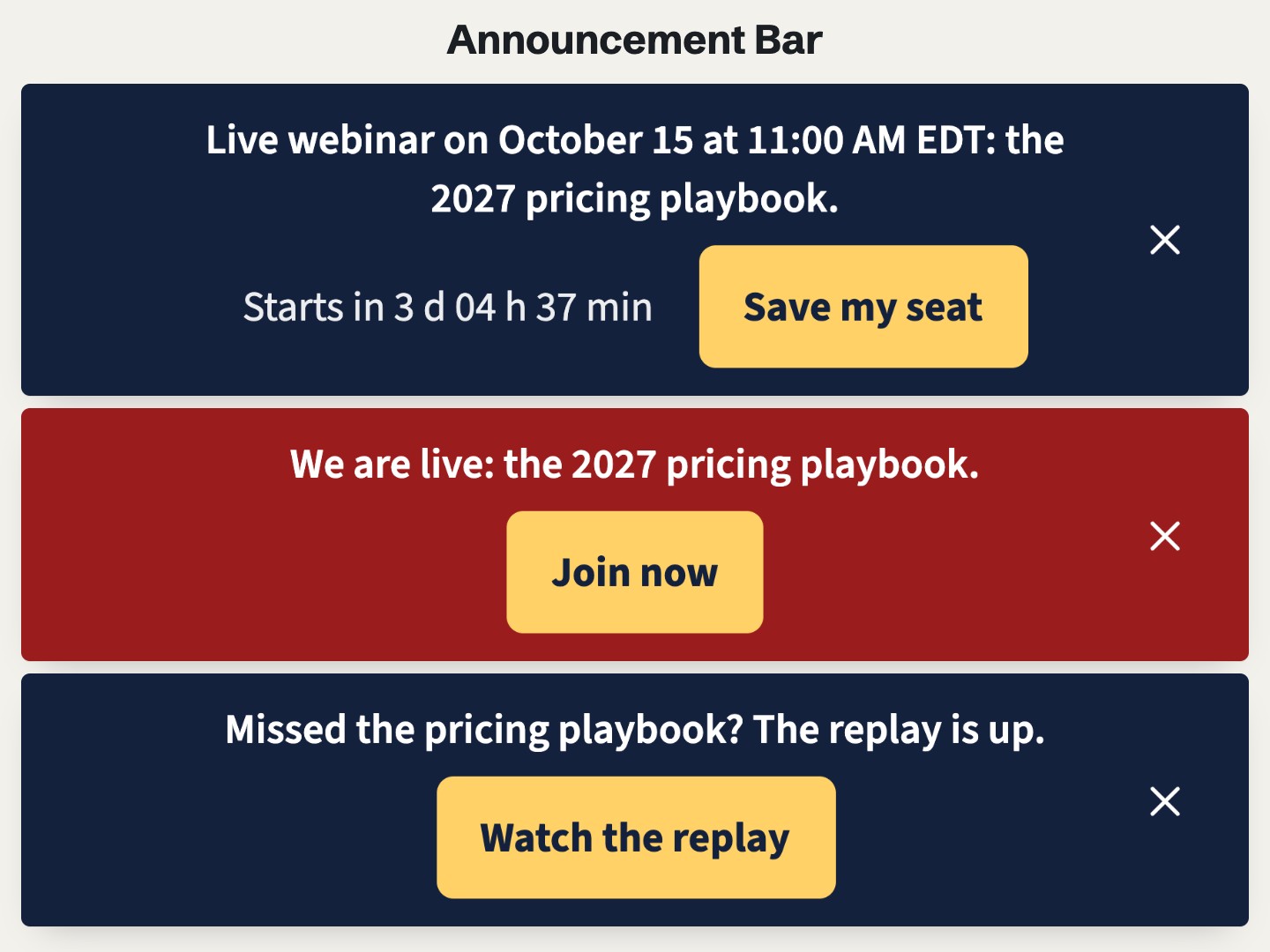
Type the start of your webinar, launch or live event once. This notification bar says "save your seat" before, "we are live" during and "watch the replay" after, then goes away. No need to edit the page on the day.
Get it free on the HubSpot marketplace (opens in a new tab) Try the demo Setup guide
Free on every HubSpot plan · For website pages, landing pages and blog posts, not emails · No extra app or account
Try it here
The first bars show the message before the event, with the countdown and the date in your time zone. Close one and reload: it stays closed. Further down, the live and replay messages.
The demo runs the real module. Open it full page.
What it does
Three messages, one date
Before, during and after, each with its own text and button, each shown at its time. Turn one off and nothing shows at that time.
Dates in the visitor's time zone
{date}and{time}in your text become the start, in each visitor's own zone, such as "March 6 at 5:00 PM EST" in New York.A countdown to the start
Beside the Before message: days, hours and minutes, then minutes and seconds in the last hour. Screen readers skip it and read the date in the text.
Switches on time
At the exact start, even on a page already open, the bar turns to your live color. At the end, the After message shows for 1 to 365 days, then the bar goes away. It is worked out in the visitor's browser, so cached pages stay right.
Closed means closed
A visitor who closes a message does not see it again in that browser, and the next message still shows. The same key shares that choice between bars on several pages. Kept in the browser's local storage, not in a cookie.
In the page or at the bottom
Place it at the top of the page, or fix it at the bottom of the screen while the visitor scrolls. Colors, live color, alignment, text size and button corners are in the Style tab.
Add it to a HubSpot page
- Install Airdate Announcement Bar from the HubSpot Template Marketplace (free).
- Open a website page or landing page in the editor, add a full-width section with no padding at the top, and drag the module into it from the Add panel.
- Set the Start and the Duration, then the text and link of the Before, During and After messages.
- Choose how many days before and after it shows, the countdown, the close button and the position, then publish.
Get Airdate Announcement Bar free on the HubSpot marketplace (opens in a new tab)
Questions
How do I add an announcement bar to a HubSpot page?
Install the module, drag it into a full-width section at the top of the page, type the start and the length of your event, and write the three messages. It switches from one to the next on its own, in each visitor's time zone.
Does it show on every page of my site?
No, only on the pages where you add it: the module has no site-wide setting. For several pages, add it to each one; bars with the same Announcement key share the closed state.
Does it work on HubSpot's free plan?
Yes. It is a regular module for website pages, landing pages and blog pages, on every HubSpot plan with pages, free included. No extra app, no extra account and no outside script.
Which time zone is used?
The start is one exact moment. {date} and {time} show it in each visitor's own zone, with the short name of the zone, such as "5:00 PM EST" or "17:00 GMT+1".
What happens when a visitor closes it?
That message stays hidden in that browser, with no end date. The next message still shows at its time. It is kept in the browser's local storage, not in a cookie; to see it again while testing, use a private window.
Is it linked to HubSpot marketing events or my webinar tool?
No. You type the start date by hand, one event per module. For the next event, change the date, or add another module.
Can I translate it?
Yes. The messages and every other text are fields, and dates and times follow the language of the page.
Can I use it in marketing emails?
No. It works in website pages, landing pages and blog pages only.
Not quite this one?
- Airdate Countdown: a countdown inside the page rather than a bar at the top.
- Airdate Early-bird Price: a price that changes on its own date, for the offer you announce in the bar.
Airdate Webinar
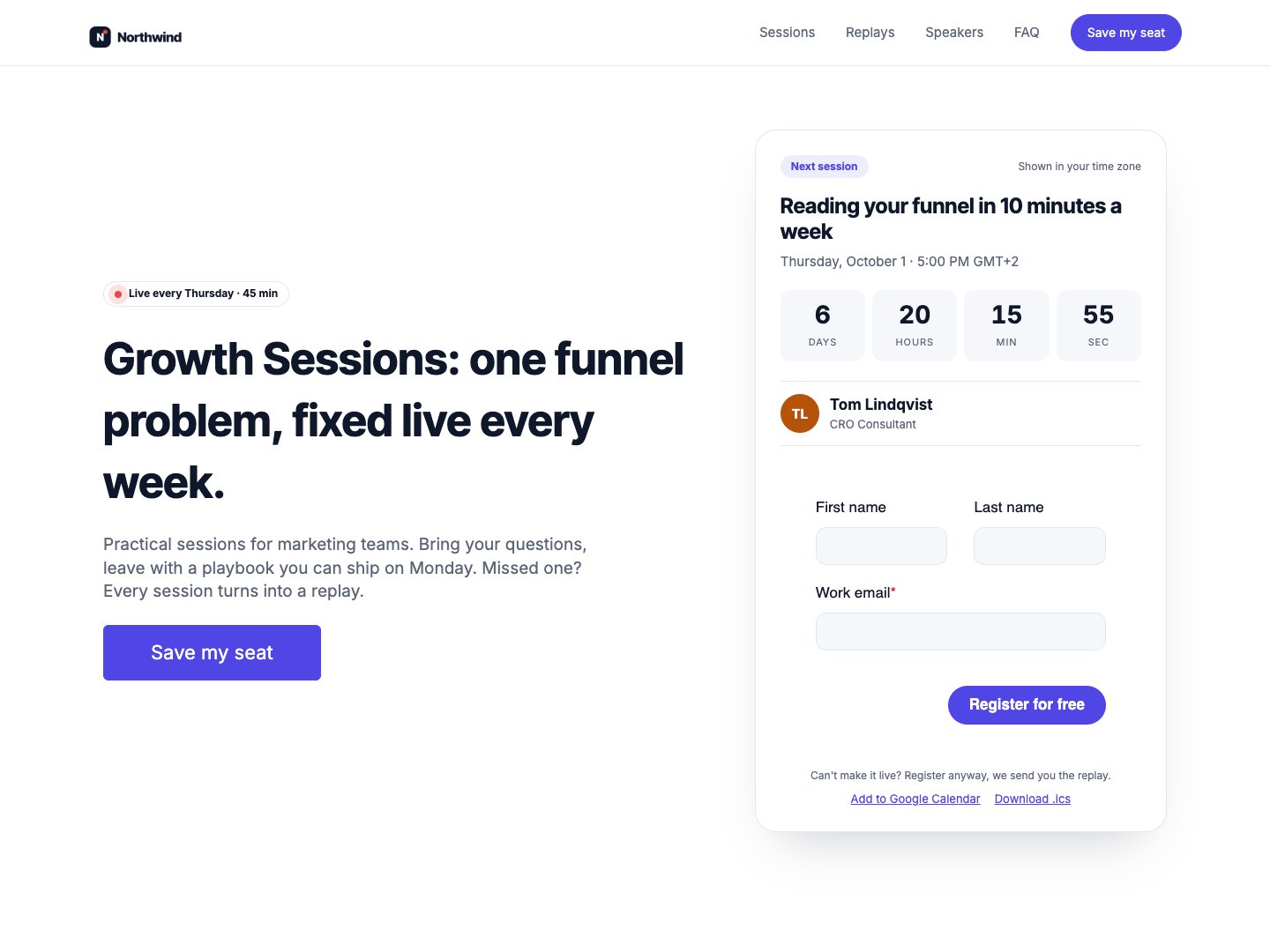
For a whole webinar series, Airdate Webinar shows the next session with its countdown on the pages you choose, and follows the series without typing the date again.
A paid HubSpot theme for recurring webinars: you type your sessions once, and every page shows the next session with a countdown, the agenda, the live state and then the replay.
See the theme on the marketplace (opens in a new tab) · Live demo (opens in a new tab)
More free modules
Questions or a bug? support@airdatethemes.com, in English or French. We answer within two business days. · Airdate Themes